
SmarterMail includes a range of security controls designed to help organisations enforce password policies, implement multi-factor authentication, monitor account compliance, and improve overall mailbox security.
Overview
Our hosted SmarterMail platform includes support for:
- Secure Webmail login
- Encrypted SSL/TLS connections
- Two-Factor Authentication (2FA)
- Google Authenticator support
- Recovery Email verification
- App Passwords for email clients and devices
- Forced domain-wide 2FA policies
- Password complexity requirements
- Password expiration policies
- Password compliance reporting
- Password age monitoring
- Password violation auditing
Table of Contents
Available Security Features
SmarterMail provides several layers of security that can be configured at either user level or domain level.
Authentication Security
- Two-Factor Authentication (2FA)
- Google Authenticator support
- Recovery Email verification
- App Passwords for client access
- Domain-wide 2FA enforcement
Password Security
- Minimum password length requirements
- Prevention of common passwords
- Password expiration policies
- Password age reporting
- Password violation logging
- Expired password tracking
Connection Security
- Secure SSL/TLS encrypted connections
- Encrypted Webmail sessions
- Secure IMAP, POP and SMTP connectivity
Security Features Available to End Users vs Domain Administrators
The table below helps explain which security features are controlled by individual mailbox users and which are managed centrally by a Domain Administrator.
| Feature | End User | Domain Administrator |
|---|---|---|
| Change mailbox password | Yes | Yes |
| Enable Two-Factor Authentication | Yes | Can enforce domain-wide |
| Use Google Authenticator | Yes | Can require 2FA |
| Use Recovery Email verification | Yes | Can require 2FA |
| Generate App Passwords | Yes | No |
| Set password policies | No | Yes |
| Set password expiry rules | No | Yes |
| View password violation reports | No | Yes |
| View password age reports | No | Yes |
| Manage domain-wide security settings | No | Yes |
Accessing Domain Settings
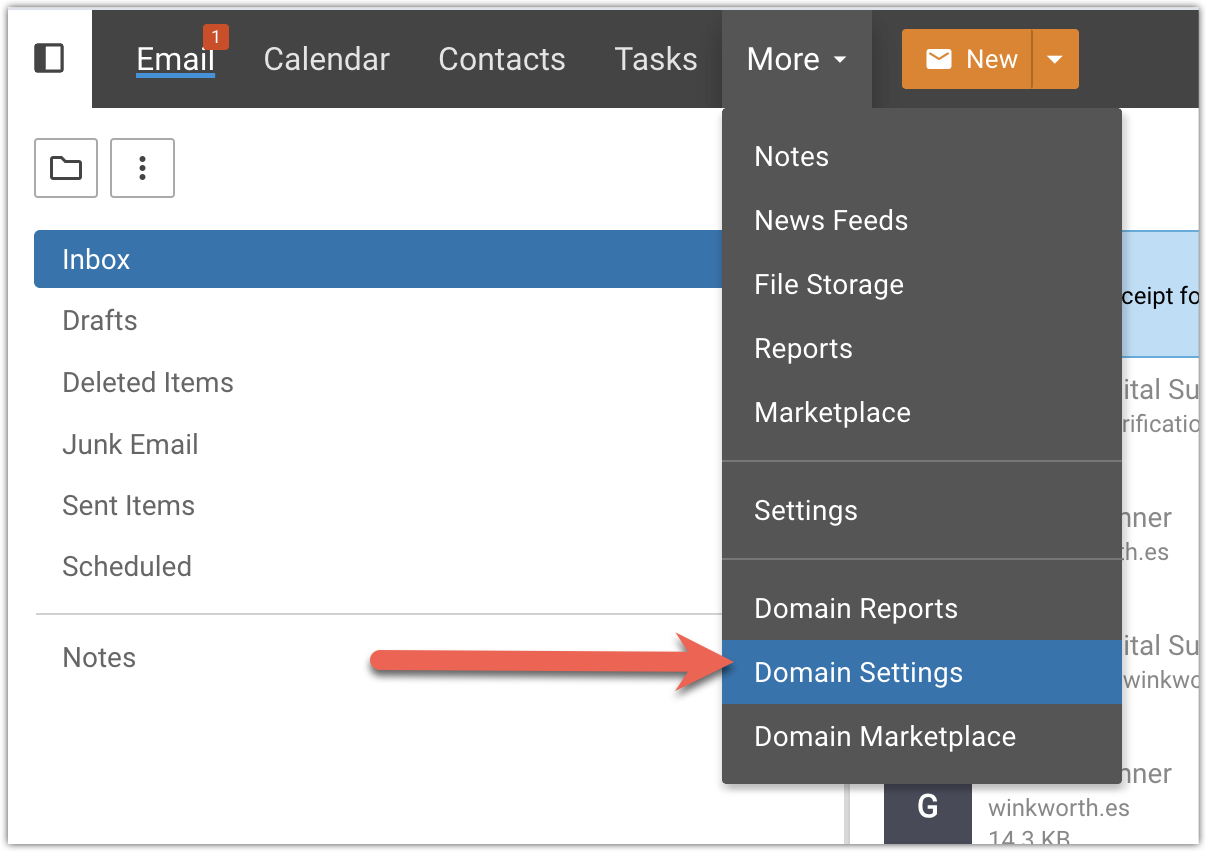
Domain Settings allow administrators to manage security policies across all mailboxes within a domain.
Log in as a Domain Administrator and navigate to:
The left-hand navigation menu provides access to all available administrative controls.
Managing Password Requirements
To review or modify password policies, select:
This section allows administrators to define password standards for all users within the domain.
Available options include:
- Minimum password length
- Prevent use of commonly compromised passwords
- Skip enforcement for existing passwords
- Automatic password expiration policies
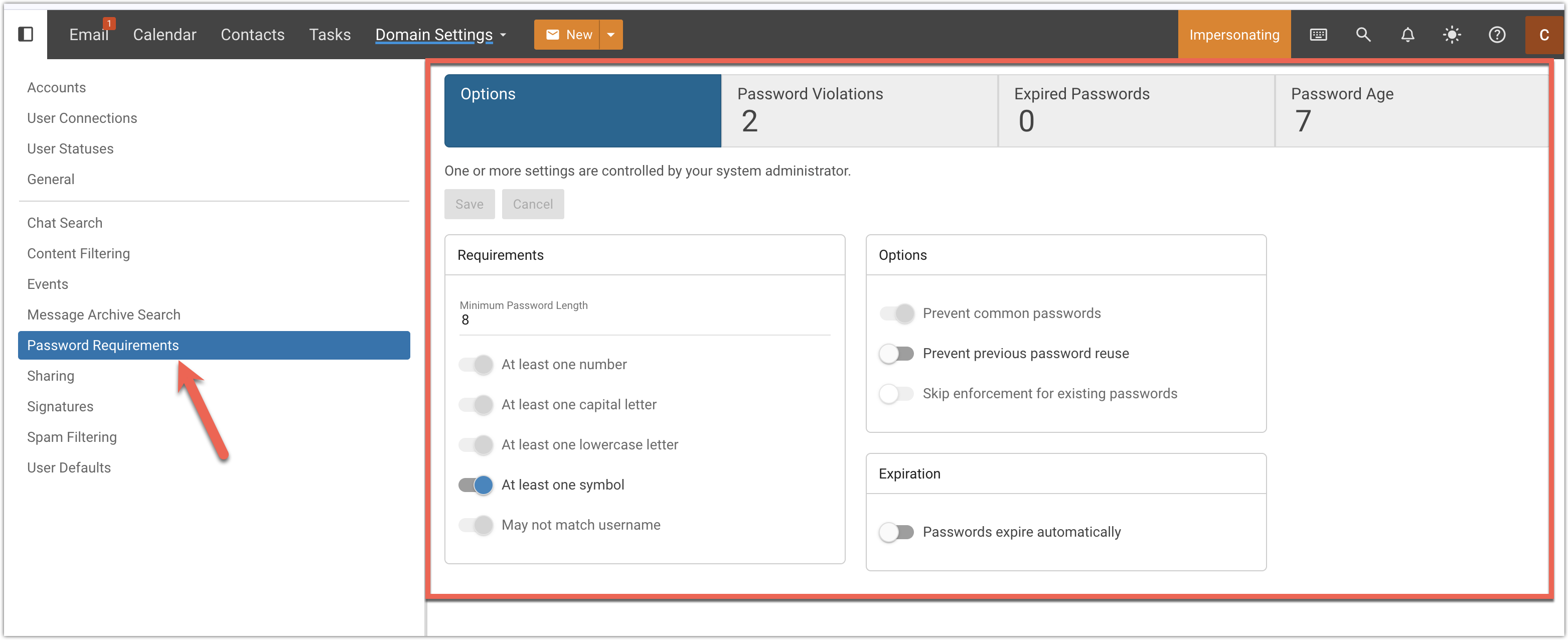
We recommend enabling common password prevention and enforcing a minimum password length of at least 12 characters wherever possible.
Enforcing Two-Factor Authentication
SmarterMail allows administrators to require all users on a domain to use Two-Factor Authentication.
To access this setting:
Within the Users / Aliases section you will find the option to enforce Two-Factor Authentication across the entire domain.
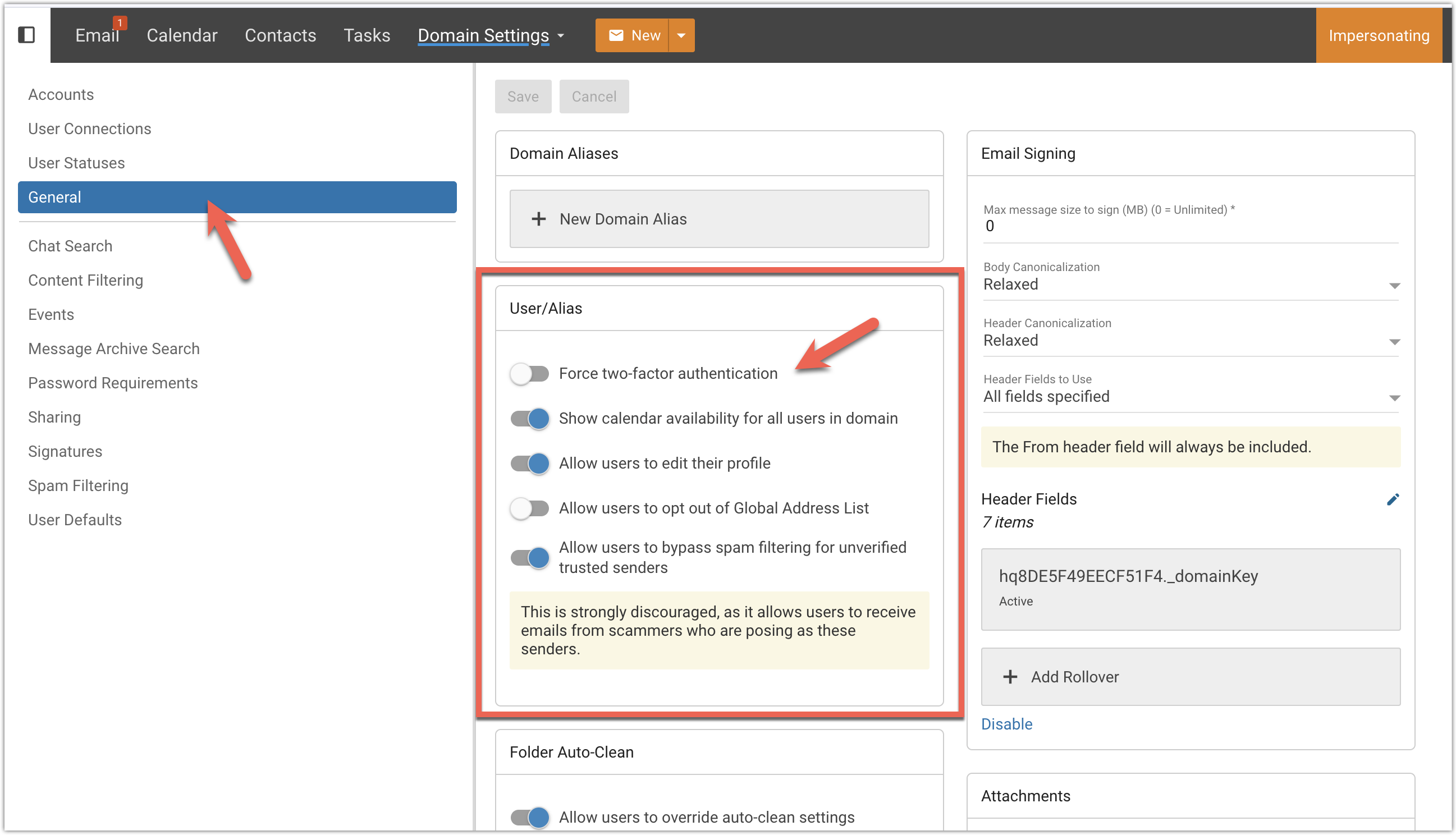
Before enabling mandatory Two-Factor Authentication, ensure users have reviewed the setup process and understand how to configure either Google Authenticator or Recovery Email verification.
Please refer to our user guide for assistance:
How to Enable Two-Factor Authentication (2FA) for Your Email Account
Password Reporting & Auditing
SmarterMail includes reporting tools that assist administrators in identifying accounts that may not meet organisational security standards.
Available reporting includes:
- Expired passwords
- Password age reports
- Password policy violations
- Accounts requiring password updates
These tools can be particularly useful for organisations operating under internal security policies, insurance requirements, or regulatory compliance frameworks.
Security Best Practices
- Enable Two-Factor Authentication for all users.
- Use Authentication Apps instead of recovery email where possible.
- Enforce minimum password lengths of at least 12 characters.
- Prevent commonly used passwords.
- Regularly review password age reports.
- Use App Passwords instead of sharing mailbox passwords with devices and applications.
- Review administrative settings periodically as part of security audits.
When configured correctly, these controls can significantly reduce the risk of unauthorised mailbox access and improve the overall security posture of your organisation.